DockCat
| 中文 | English |
DockCat is a desktop companion cat that lives by the macOS Dock.
It rests, stretches, and wanders along the Dock, and can gently remind you to drink water or stand up for a short walk. DockCat is meant to be a quiet little presence on your screen: soft, lightweight, and never too demanding. You can pet the cat to change its pose, or drag it to a cozy spot you like. When you need to focus or leave, you can let the cat play outside for a while, and it may come back with a tiny surprise.
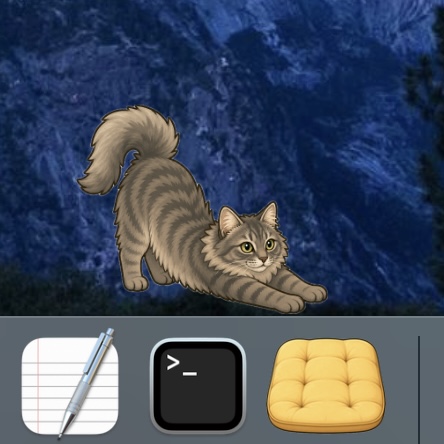 |
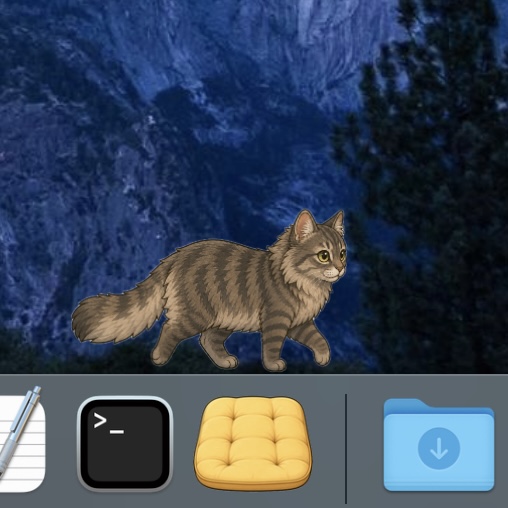 |
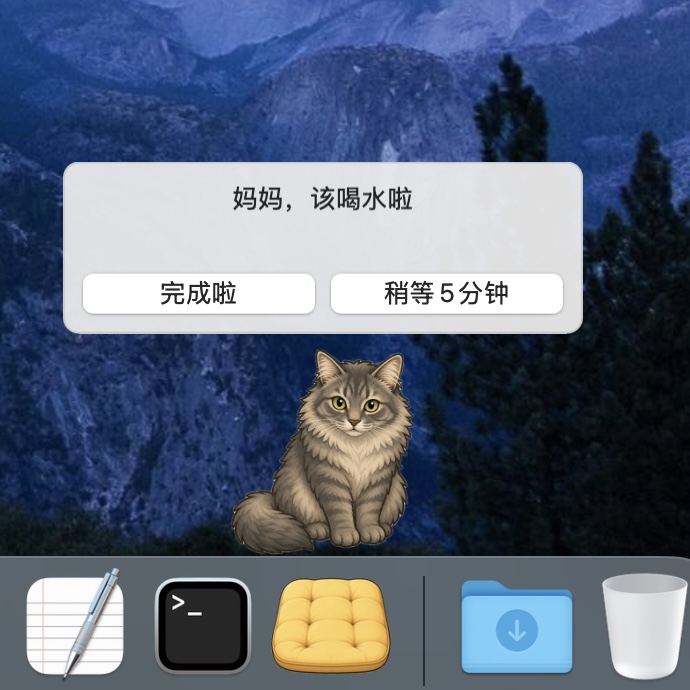 |
| Stretch | Walk | Water reminder |
The current version (v0.7.0) supports macOS 12 and later, on both Intel Macs and Apple Silicon Macs.
Windows users can check out the community ported version.
Quick Start
If you’d like to let the cat move in, we recommend downloading DockCat.zip from GitHub Releases.
- Open this repo’s Releases page.
- Download the latest
DockCat.zip. - Unzip it, then drag
DockCat.appinto Applications or any folder you prefer. - On first launch, right-click
DockCat.app, choose Open, then confirm. - If macOS says it cannot verify the developer, allow the app in System Settings > Privacy & Security.
Usage
- After launch, a cat will appear along the upper edge of the Dock.
- Right-click the cat or the app icon to open the menu.
- Settings let you change the cat’s name, what it calls you, display scale, reminder intervals, and more.
- Custom cat asset packs are supported, so you can make DockCat look like your own cat.
The cat can switch between these states:
- Resting: the cat holds a pose for a while, such as lying on its side, loafing, or showing its belly.
- Walking: the cat walks back and forth along the Dock.
- Transitioning: the cat briefly stretches or yawns.
- Held: drag the cat with the left mouse button to move it.
- Dialogue: the cat faces you for reminders and outing conversations.
- Outing: the cat goes out for the duration you choose, then comes back with something funny. Please try it!
Can I Customize The Cat?
Yes! Supporting custom cats was one of our original goals when designing DockCat.
To create artwork for your own cat:
- We share the prompts used for the default cat in ImageGenerationPrompts.md. You can pair them with photos of your own cat in your preferred AI image generation tool.
- You can also use the default cat images as pose references and ask an AI image generation tool to keep the pose while changing the breed, colors, and markings. Remember to include image size and file format requirements.
- We recommend starting with the standing dialogue pose, because it shows the cat’s colors and markings most clearly.
Next, let DockCat load your cat asset pack. Please read the customization guide: CatCustomization.md.
- To use your own cat in every scene, provide at least one image for each of these five state folders: resting, walking, transitioning, held, and dialogue.
- DockCat can load incomplete custom packs for preview. Missing or failed asset types automatically fall back to the default cat, so your little companion will not vanish from the screen.
- You can add as many images as you want to the same state folder. Whenever the cat enters a non-walking state, DockCat randomly picks one available image from that folder. Walking images are played in order as a looping animation.
If you need help creating or loading your own asset pack, you can find our contact information in Support And Contact below.
PS: Since DockCat can read any image, it does not strictly have to be a cat, right? 👀
Build From Source
If you want to modify the cat’s behavior or event resources, you can build from source.
Xcode build command:
git clone https://github.com/Auwuua/DockCat.git
cd DockCat
xcodebuild -project DockCatApp/DockCat.xcodeproj -scheme DockCat -configuration Debug -derivedDataPath DockCatApp/DerivedDataDebug build
open DockCatApp/DerivedDataDebug/Build/Products/Debug/DockCat.app
Privacy And Local Data
DockCat runs completely locally on your Mac. It does not require network access, transmit data, or include ads.
It stores only the necessary app data on your Mac:
- Your custom settings, such as the cat’s name, what it calls you, reminder intervals, and default outing duration.
- Your usage statistics, such as companion time, completed water and movement reminders, and collectables the cat brought home.
- Your custom cat asset packs.
When you update DockCat, it automatically reads the app’s previous local data. If you use custom asset packs, we recommend keeping your own backup as an extra precaution.
License
DockCat uses the PolyForm Noncommercial License. See LICENSE.txt for the full terms. In short:
- You may freely read, copy, modify, and build your own version of DockCat from this source code.
- You may not use DockCat or modified versions of it for commercial purposes, including selling it, paid distribution, or bundling it with commercial products. Commercial use requires additional authorization.
- If you publicly distribute a modified version, you must keep the original license and copyright notice, provide a link to this project, and describe your changes.
Support And Contact
DockCat is under active development. We plan to add more customizable functions and continue expanding the outing result list.
If you enjoy DockCat, please consider starring this project at the top right of this page, or Buy Me a Coffee.
If you need help while using DockCat, or want to support DockCat in another way, here is how to reach us:
- Email: tianmaizhang@gmail.com
We hope DockCat brings you the soft companionship you love.